free preview · free account to download
Try the free image upscaler before signing up
* Free to use — selecting, editing and every export run in your browser, and nothing is uploaded unless you start a step that says it will: the AI tools, background removal on its sharper engine (an in-browser engine is one click away under the same button), or upscaling a photograph (logos and flat artwork are enlarged on your device). A free account (Google, Apple or an emailed code — no card) is needed to download the finished file, and comes with credits for the server-side tools.
Run and preview two server upscales a day without an account, at up to 4 megapixels. All downloads require a free account — that includes the finished PNG. Signing in needs no payment card, and no export carries an added watermark.
Upscale an imageWhat you get without signing up
Two server upscales a day, up to 4 megapixels out, with the result available to inspect and edit in your browser. Downloading requires a free account. Sign-in raises the server allowance to three a day at up to 8 megapixels and includes 6 signup credits for metered tools, with no payment card required. Flat artwork can use the local enlargement path, which does not spend the server allowance.
Why the daily cap exists, honestly
Because this one costs us money to run. Most of the editor is free because it executes in your browser and costs nothing to give away — an unlimited offer there is easy. An upscale is real GPU time on somebody’s hardware, so an unmetered version would be a promise we would quietly have to break later. Two a day is what we can hand out without that happening, and we would rather say so than dress a limit up as a feature.
It is not a resize
Enlarging in Photoshop, GIMP or Preview interpolates — it averages between the pixels you already have, which produces a bigger file with no more information in it. A model reconstructs instead: it has seen enough edges to rebuild what a boundary ought to look like at four times the size. That is why the result reads as sharp rather than as a smooth enlargement. It also means the gain is biggest on photographs, where there is real texture to rebuild, and smallest — occasionally negative — on flat type, where a reconstructed letterform can come back subtly the wrong shape.
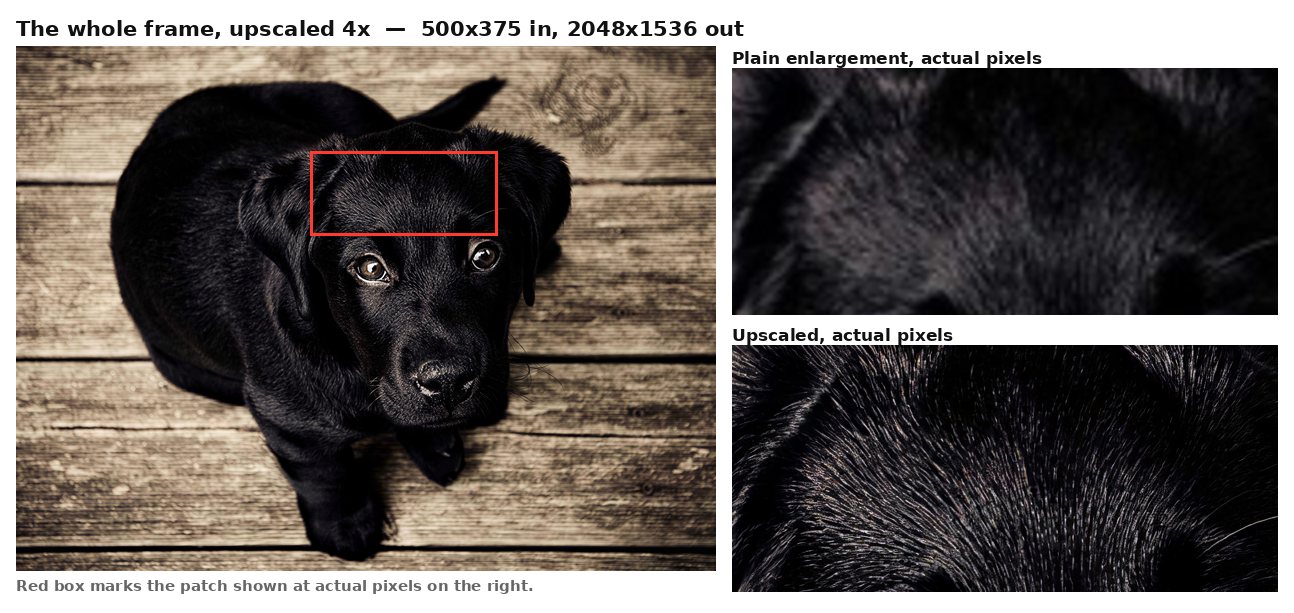
The part most upscalers do not tell you
The picture is uploaded. That is unavoidable for a model of this size and we are not going to imply otherwise — the editing, selection and export path runs in your browser and genuinely transmits nothing, which is exactly why it matters to be precise about the one tool that does not. The source is deleted the moment the upscale returns, held under a storage rule that clears anything left within 24 hours, and is never used to train a model.
What it is actually for
It exists because print work keeps arriving too small — a logo lifted off a website that now has to go on a shirt, a customer supplying the only file they have. It sits alongside a full layered editor rather than on its own, so the upscaled result can go straight into colour separation, background removal or a layered PSD without a round trip through another tool.
Frequently asked
Is it really free?
You can run and preview two server upscales a day without an account. All downloads require a free account, which also gives three server upscales a day at a higher resolution limit. No payment card is required and no watermark is added.
Can I download without signing up?
No. A free account is required for every download, including the upscaled PNG. You can inspect the result in the editor before signing in.
What are the limits?
Server upscaling has a daily allowance: two runs at up to 4 megapixels signed out, or three at up to 8 megapixels with a free account. Further server runs use credits. Downloads require free sign-in; PNG is free and unlimited after sign-in.
What formats?
Open a supported image and download the upscaled result as a lossless PNG after free sign-in. You can also keep editing it in the layered editor before exporting.
Do you keep my image?
No. It is deleted as soon as the upscale returns, and never used for training.
Should I re-run it to get a better result?
It will not help. The model is deterministic — the same image in gives a byte-for-byte identical image out, which we verified. Given the daily cap that matters: a retry spends one of your goes and returns the file you already have.
Keep reading
Upscale artwork for printingSeparate an image into layers, freeHigh-resolution image to PSDRelated
How to get an image to 300 dpi for printingSeparate an image into layers online — try the editor freeHow to edit text in a flattened image in PhotoshopPrepare artwork for DTF transfersSeparate a design into colour layers for vinyl cuttingPrepare a sublimation design with a transparent backgroundGet artwork print-on-demand readyTurn a screenshot into an editable, layered PSD